|
Kyth
|
 |
« Reply #120 on: June 05, 2011, 01:45:15 AM » |
|
Kyth
Thanks for getting back to this. Nope, not giving up just a bad case of the flu. My line is now edited to this-all is the same as yours with the exception of 0, and it's still a no-show.
ext, add_mo, map0, attack_rub, 0xc0000080, 0x80202020, 4.0, 0, txt_md_ger_startzone1, 0, startzone1, -1, true, 0;
I'm deleting the "0" to see what happens, and.......nothing. makes no difference. the symbol does not show up.
Make sure there's an actual contour in the Mission Editor map that's named "startzone1". Not "Startzone1" or "startzone01" etc. The name in the script must match up. ext, add_mo, map0, attack_rub, 0xc0000080, 0x80202020, 4.0, txt_md_ger_startzone1, 0, startzone1, -1, true, 0;should get a rather large symbol plonked down on the briefing screen: 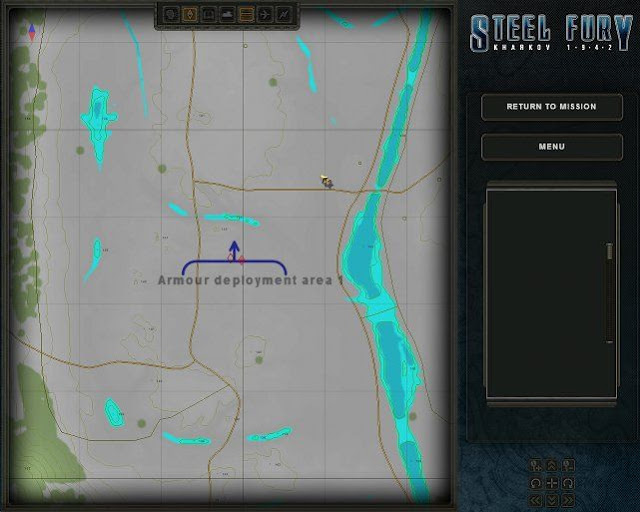 |
|
|
|
|
 Logged
|
"What am I, chopped liver..?"
"Yes."
|
|
|
|
hemisent
|
|
« Reply #121 on: June 05, 2011, 06:57:22 PM » |
|
Kyth & Iceman Success at last. Got the blue symbol but the text was gray question marks. I played around with the text line and finally found my error.  Thanks-off to make copies of these working lines and sort of make a tutorial to myself-more questions to follow I'm sure. Cheers H |
|
|
|
« Last Edit: June 05, 2011, 07:26:00 PM by hemisent »
|
Logged
|
|
|
|
|
Kyth
|
|
« Reply #122 on: June 06, 2011, 02:08:58 AM » |
|
Kyth & Iceman Success at last. Got the blue symbol but the text was gray question marks. I played around with the text line and finally found my error. Thanks-off to make copies of these working lines and sort of make a tutorial to myself-more questions to follow I'm sure. Cheers H Okay, good  Add this to your tutorial: In adding any map object, (the ext, add_mo command) the following describes the relevant settings in each line: 1 2 3 4 5 6 7 8 9 10 11
ext, add_mo, map0, attack_rub, 0xc0000080, 0x80202020, 4.0, txt_md_ger_startzone1, 0, startzone1, -1, true, 0;1. Name of the object, or group of objects. Useful for changing colours, or removing later on.
2. Symbol or sprite name. Refer to table 9.2 for a listing.
3. Symbol colour (0x, alpha, red, green, blue)
4. Text colour (0x, alpha, red, green, blue), if any.
5. Size of the object. At any one size, some symbols are already larger than others, so play around to see what's suitable.
6. Text string for (4), if any.
7. Skew / tilt angle of the symbol in degrees. Ranges from -180 to 180. '0' = symbol follows the map contour heading.
8. Map contour for the placement of the symbol.
9. Contour point number. Default '-1' (not specific). Anyway, try to use one-point contours for placement of symbols.
10. Rotate along with the map, true / false. Flag symbols should always be upright, hence, 'false'. (Flag placement contours should point due north).
11. Offset value for text, left-right. Default value '0' (centered). |
|
|
|
« Last Edit: June 06, 2011, 02:12:38 AM by Kyth »
|
Logged
|
"What am I, chopped liver..?"
"Yes."
|
|
|
|
frinik
|
|
« Reply #123 on: June 06, 2011, 02:27:38 AM » |
|
Hem Hemi we are all impatiently waiting for your first mission.... |
|
|
|
|
Logged
|
|
|
|
Iceman
Graviteam
Oberstleutnant

Posts: 141
*Graviteam* (Assistant Deputy Backup Courier)
|
|
« Reply #124 on: June 06, 2011, 09:52:13 AM » |
|
added to FAQ |
|
|
|
|
Logged
|
дополнительный Помощник младшего Заместителя вспомогательного Курьера
|
|
|
|
Kyth
|
|
« Reply #125 on: June 06, 2011, 11:18:08 AM » |
|
Thanks, |
|
|
|
|
Logged
|
"What am I, chopped liver..?"
"Yes."
|
|
|
|
frinik
|
|
« Reply #126 on: June 06, 2011, 02:47:25 PM » |
|
Hemi-ssion! We want our first Hemi-ssion |
|
|
|
|
Logged
|
|
|
|
|
hemisent
|
|
« Reply #127 on: June 06, 2011, 08:35:03 PM » |
|
Kyth
That was exactly what I needed. Up to now I've been filling in the the different items with what I have gathered from the various threads and replies but a lot was left open. This helped out a bunch.
I haven't even gotten to the radio messages and triggers yet but what I would like is a short, step by step guide to the initial mission briefing. I know it seems like I don't read the manual that much but I do and I really have a hard time deciphering it the way it presented. I've read all the threads I can find about the briefing but cannot get it to show up. I'm sure it's some small error but so far unable to pin it down
Frinik
I have something in mind but still need to firm up my understanding of many of these fine points. I believe the briefing, map info and radio traffic are just as important to a good mission experience as the actual mission itself. That's why I find Kyth's missions so amazing and now I have a bit of understanding of all that goes into it.
Again, thanks to all for the help.
H
|
|
|
|
|
Logged
|
|
|
|
|
Kyth
|
|
« Reply #128 on: June 07, 2011, 01:32:31 AM » |
|
what I would like is a short, step by step guide to the initial mission briefing.
Hi, Actually adding the lines for the initial briefing is one of the easier things. Take the example below: ext, add_misobj, brief, map_ritmental, 4, txt_brief_testmission_1, txt_mis_order;
nop;The 1st line consists of: - The command ext, add_misobj (add mission objective) - Name of the objective, in this case just 'brief' - Contour on the map. Supposedly the location of the ultimate objective. But you can leave it blank also, - Status of the objective ( 4 - information only ) - Text string for the briefing, goes into the main box in the briefing screen. - Text string for a description, goes into the side-box in the briefing screen. In this case, use the txt_mis_order string - "Mission" The 2nd line, which is ' nop;' (no operation) indicates that the game should pause here and wait for the player to start. |
|
|
|
|
Logged
|
"What am I, chopped liver..?"
"Yes."
|
|
|
|
Kyth
|
|
« Reply #129 on: June 07, 2011, 01:55:09 AM » |
|
Talking about the briefing, it's best to format it in a readable and presentable way. Take the 'inspiring' briefing example below:
Well, now it's official:
We're surrounded!
The breakout is planned for tonight - you and your tank platoon will take the lead, along with whatever infantry support we can collar. You will be heading in the direction of Ritmental, where we think they won't be expecting us. Watch out for ambushes!
And one more thing, don't screw up, or it'll surely be the last time ever for you!
Formatting tags for the in-game text strings are: \t - tab or indent \n - move to next line The example above would look like this in the 'xxx_loc_data.text' file:
txt_brief_testmission_1() { \n\t\tWell, now it's official: \n\n\t\tWe're surrounded!\n\n\t\tThe breakout is planned for tonight - you and your tank platoon will take the lead, along with whatever infantry support we can collar. You will be heading in the direction of Ritmental, where we think they won't be expecting us. Watch out for ambushes!\n\n\t\tAnd one more thing, don't screw up, or it'll surely be the last time ever for you!; }
The end-result should look like the screen below:  Good luck, but you won't need it, if you follow my instructions exactly! |
|
|
|
|
Logged
|
"What am I, chopped liver..?"
"Yes."
|
|
|
|
hemisent
|
|
« Reply #130 on: June 07, 2011, 09:42:17 PM » |
|
Thanks kyth
This is what I was looking for. Except.......you mention the loc_data.text file. I've seen this file name in other threads and for the life of me I cannot find it. The closest thing I come up with is in the
data/k42/loc_rus/text folder, which contains three filer with the loc_ prefix:
loc_kit.text
loc_kit_subs.text
loc_kit_tools.text
Can you direct me or is this yet another folder my DL'd version is missing?
Thanks
H
|
|
|
|
|
Logged
|
|
|
|
Rends
Generalmajor

Posts: 300

|
|
« Reply #131 on: June 07, 2011, 10:08:19 PM » |
|
hemi
check your data/k42/loc_rus/levels/LEVELS/SCRIPTS/"campaign name" directory for the text files
|
|
|
|
|
Logged
|
|
|
|
|
hemisent
|
|
« Reply #132 on: June 07, 2011, 10:33:24 PM » |
|
Thanks Rends
I knew it had to be something dumb. I was looking in the wrong area.
I plugged in Kyth's example in my test mission file and I still get nothing on the initial briefing screen.
//Graviteam mission create system ver. 0.1
loc_rus()
{
//äîáàâü òåêñò ñþäà
//â ôîðìàòå txt_ldm_<èìÿ òàáëèöû íà àíãëèéñêîì>() { <òåêñò1> ; <òåêñò2>; ... <òåêñò n>; }
//ïðèìåð: txt_ldm_text1() { Òåêñòîâàÿ ñòðîêà ¹1; }
}
loc_eng()
{txt_brief_single tiger-02() { \n\t\tWell, now it's official: \n\n\t\tWe're surrounded!\n\n\t\tThe breakout is planned for tonight - you and your tank platoon will take the lead, along with whatever infantry support we can collar. You will be heading in the direction of Ritmental, where we think they won't be expecting us. Watch out for ambushes!\n\n\t\tAnd one more thing, don't screw up, or it'll surely be the last time ever for you!; }
}
|
|
|
|
« Last Edit: June 07, 2011, 10:57:36 PM by hemisent »
|
Logged
|
|
|
|
|
Kyth
|
|
« Reply #133 on: June 07, 2011, 11:13:16 PM » |
|
I plugged in Kyth's example in my test mission file and I still get nothing on the initial briefing screen.
//Graviteam mission create system ver. 0.1
loc_rus()
{
//äîáàâü òåêñò ñþäà
//â ôîðìàòå txt_ldm_<èìÿ òàáëèöû íà àíãëèéñêîì>() { <òåêñò1> ; <òåêñò2>; ... <òåêñò n>; }
//ïðèìåð: txt_ldm_text1() { Òåêñòîâàÿ ñòðîêà ¹1; }
}
loc_eng()
{txt_brief_single tiger-02() { \n\t\tWell, now it's official: \n\n\t\tWe're surrounded!\n\n\t\tThe breakout is planned for tonight - you and your tank platoon will take the lead, along with whatever infantry support we can collar. You will be heading in the direction of Ritmental, where we think they won't be expecting us. Watch out for ambushes!\n\n\t\tAnd one more thing, don't screw up, or it'll surely be the last time ever for you!; }
}
The name of the text string should not have any spaces in between. Avoid dashes also. Like this: txt_brief_single_tiger_02Did you add in the 2 lines, mentioned in my earlier post? They should be in the cs_main() section, by the way. Let's take a look at them, |
|
|
|
|
Logged
|
"What am I, chopped liver..?"
"Yes."
|
|
|
Iceman
Graviteam
Oberstleutnant
Posts: 141
*Graviteam* (Assistant Deputy Backup Courier)
|
|
« Reply #134 on: June 08, 2011, 09:40:58 AM » |
|
Thanks Rends
I knew it had to be something dumb. I was looking in the wrong area.
I plugged in Kyth's example in my test mission file and I still get nothing on the initial briefing screen.
//Graviteam mission create system ver. 0.1
loc_rus()
{
//äîáàâü òåêñò ñþäà
//â ôîðìàòå txt_ldm_<èìÿ òàáëèöû íà àíãëèéñêîì>() { <òåêñò1> ; <òåêñò2>; ... <òåêñò n>; }
//ïðèìåð: txt_ldm_text1() { Òåêñòîâàÿ ñòðîêà ¹1; }
}
loc_eng()
{txt_brief_single tiger-02() { \n\t\tWell, now it's official: \n\n\t\tWe're surrounded!\n\n\t\tThe breakout is planned for tonight - you and your tank platoon will take the lead, along with whatever infantry support we can collar. You will be heading in the direction of Ritmental, where we think they won't be expecting us. Watch out for ambushes!\n\n\t\tAnd one more thing, don't screw up, or it'll surely be the last time ever for you!; }
}
Do not use section loc_eng()! Write all text in section loc_rus()The section loc_eng() more isn't actual after localization Additional. The program ignores the standard line breaks and tabs. So you can divide lines for the convenience Ie will work like this loc_rus()
{
txt_brief_single_tiger_02() { \n\t\tWell, now it's official: \n\n\t\tWe're surrounded!\n\n\t\tThe breakout is planned for tonight - you and your tank platoon will take the lead, along with whatever infantry support we can collar. You will be heading in the direction of Ritmental, where we think they won't be expecting us. Watch out for ambushes!\n\n\t\tAnd one more thing, don't screw up, or it'll surely be the last time ever for you!; }
} and this loc_rus()
{
txt_brief_single_tiger_02() { \n\t\tWell, now it's official:\n\n\
t\tWe're surrounded!\n\n
\t\tThe breakout is planned for tonight - you and your tank platoon will take the lead, along with whatever infantry support we can collar. You will be heading in the direction of Ritmental, where we think they won't be expecting us. Watch out for ambushes!\n\n
\t\tAnd one more thing, don't screw up, or it'll surely be the last time ever for you!; }
} And like say Kith, not use any spaces and dashes in name of identifiers.
P.S. Example of text from mission for video-lesson Original Google translation |
|
|
|
|
Logged
|
дополнительный Помощник младшего Заместителя вспомогательного Курьера
|
|
|
|
hemisent
|
|
« Reply #135 on: June 09, 2011, 11:16:20 PM » |
|
Thank you guys
Here's the edited text in the loc_rus() section.
loc_rus()
{
txt_brief_single_ tiger-02() { \n\t\tWell, now it's official: \n\n\t\tWe're surrounded!\n\n\
t\tThe breakout is planned for tonight - you and your tank platoon will take the lead, along with whatever infantry support we can collar. You will be heading in the
direction of Ritmental, where we think they won't be expecting us. Watch out for ambushes!\n\n\
t\tAnd one more thing, don't screw up, or it'll surely be the last time ever for you!; }
And here's the cs_main()
cs_main()
{
ext, add_misobj, brief, start, 4, txt_brief_single_tiger_02, txt_mis_order;
nop;
}
Kyth, I could not locate your earlier reply about the correct structure for the cs_main although I know I've read it in my travels. I copied this from another single mission, plugged it in and now I get question marks. Now something is at least showing up-progress at last! I'm sure the problem now lies here.
|
|
|
|
|
Logged
|
|
|
|
Txema
Generalmajor
Posts: 371
|
|
« Reply #136 on: June 10, 2011, 12:19:21 AM » |
|
This is not correct:
txt_brief_single_ tiger-02()
Please, use:
txt_brief_single_ tiger_02()
Txema
|
|
|
|
|
Logged
|
|
|
|
|
Kyth
|
|
« Reply #137 on: June 10, 2011, 01:35:05 AM » |
|
Here's the edited text in the loc_rus() section.
loc_rus()
{
txt_brief_single_ tiger-02() { \n\t\tWell, now it's official: \n\n\t\tWe're surrounded!\n\n\
t\tThe breakout is planned for tonight - you and your tank platoon will take the lead, along with whatever infantry support we can collar. You will be heading in the direction of Ritmental, where we think they won't be expecting us. Watch out for ambushes!\n\n\
t\tAnd one more thing, don't screw up, or it'll surely be the last time ever for you!; }
Hi, txt_brief_single_ tiger-02What's up with all those spaces and dashes? There's a simple rule : avoid them! When it comes to naming, use alphanumerics and underscores only. I'll repeat the correct example yet again: txt_brief_single_tiger_02To make things consistent, it might be easier to do a 'copy and paste' when it comes to names of strings, contours and such. |
|
|
|
« Last Edit: June 10, 2011, 02:12:58 AM by Kyth »
|
Logged
|
"What am I, chopped liver..?"
"Yes."
|
|
|
|
hemisent
|
|
« Reply #138 on: June 10, 2011, 10:10:03 PM » |
|
Thanks guys
Where I'm screwing up big time is mistaking the name of my test mission which is single tiger-02 with the way the game wants to read it single_tiger_02. I've got to be more aware of the lack of spacing and underscoring correctly.
I just edited everything to the way Txema has it and it works...only not in the way I thought it would.
Using Kyth's example in my loc_data.text
loc_rus()
{
txt_brief_single_tiger_02() { \n\t\tWell, now it's official: \n\n\t\tWe're surrounded!\n\n\
t\tThe breakout is planned for tonight - you and your tank platoon will take the lead, along with whatever infantry support we can collar. You will be heading in the direction of Ritmental, where we think they won't be expecting us. Watch out for ambushes!\n\n\
t\tAnd one more thing, don't screw up, or it'll surely be the last time ever for you!; }
and:
cs_main()
{
ext, add_misobj, brief, start, 4, txt_brief_single_tiger_02, txt_mis_order;
nop;
}
I expected Kyth's narrative to show up but it didn't. Instead what I got was a test narrative that I'd been playing with following instructions in the ME manual pg 43. I created a text file per the manual in the SF/data/k42/loc_rus/text folder. I had written my narrative in the loc_rus() section. Now this shows up but Kyth's doesn't.
The manual says that messages, briefings etc are written in the scripts file. So, if I understand correctly, the test narrative I created in the "text" file(not Kyth's) shows up on the lower center screen upon mission start but the work in the "scripts" file shows up when and how? I'm happy that something is working just not understanding why.
How then do I get Kyth's example to show...what triggers it?
Thanks again for all patience with these noob questions.
H
|
|
|
|
|
Logged
|
|
|
|
|
Kyth
|
|
« Reply #139 on: June 11, 2011, 12:15:10 AM » |
|
Thanks guys
Where I'm screwing up big time is mistaking the name of my test mission which is single tiger-02 with the way the game wants to read it single_tiger_02. I've got to be more aware of the lack of spacing and underscoring correctly.
I just edited everything to the way Txema has it and it works...only not in the way I thought it would.
I expected Kyth's narrative to show up but it didn't. Instead what I got was a test narrative that I'd been playing with following instructions in the ME manual pg 43. I created a text file per the manual in the SF/data/k42/loc_rus/text folder. I had written my narrative in the loc_rus() section. Now this shows up but Kyth's doesn't.
You'll have to delete the unwanted 'briefing' in the text folder. The files in the text folder are intended for general text translations, like menus, editor, campaign / mission names and for the game's stock missions.
The manual says that messages, briefings etc are written in the scripts file. So, if I understand correctly, the test narrative I created in the "text" file(not Kyth's) shows up on the lower center screen upon mission start but the work in the "scripts" file shows up when and how? I'm happy that something is working just not understanding why.
How then do I get Kyth's example to show...what triggers it?
Think of the Mission files as a set of 4. Everything mission-related has to be contained in one of these files: - <mission_name>.levelContains information about the map used, weather settings and links to the other 3 files. - <mission_name>_loc_data.textContains all the text strings relevant to the mission. - <mission_name>_scripts.engscrAll the scripts, triggers, units are located in this important file. - <mission_name>_zones.engcfgAll the zones (contours) marked out in the mission map are listed down here. If you're familiar with files and folders, every mission has a 'tree' of related files. The example below is my 'Mission 1'. Pay special attention to the files marked blue here: <Steel Fury main folder>\data\k42\loc_rus\
|
|
|
|------------------------------------------------------------------------
| | | |
| | | |
levels\ envs\ images\ text\
| | | Mynewmissions.text
| | |
LEVELS\ M04_Bereka\ backs\
| New_KY_01_lightmap.raw Back_KY_01.tga
|
|
|--------------------------------------------------
| | |
| | |
cm_users\ scripts\ weather\
New_KY_01.level | Weather_Kyth.engcfg
|
cm_users\
New_KY_01_script.engscr
New_KY_01_zones.engcfg
New_KY_01_loc_data.text |
|
|
|
|
Logged
|
"What am I, chopped liver..?"
"Yes."
|
|
|
|



